
For as long as Search Console has existed, it has answered exactly one question: how is my website doing in Google?
That was always a slightly awkward limitation. Your brand does not live on one domain. It lives on a website, a YouTube channel, an Instagram grid, a TikTok feed, and an X profile, and people find all of those through Google. You just had no way to see it. If a client asked "is our TikTok helping us in search?", the honest answer was a shrug and a theory.
In July 2026, Google closed that gap. Platform properties are a new Search Console property type that lets you verify an Instagram, TikTok, X or YouTube account and see how that content performs in Google Search, Discover and News. It is the first Search Console property you can verify without owning the domain the content sits on.
We added all four Rafenthic accounts the week it became available. This guide covers what platform properties are, how to add each one, what the reports actually contain, and the part most coverage skips: what to do with the data once you have it.
What are Google Search Console platform properties?
A platform property is a Search Console property tied to a social or video account instead of a website.
You verify ownership of the account, and Google then reports how that account's posts and videos are discovered through Google Search. Every account is added and tracked separately, so your Instagram data and your TikTok data never blend together.
Four platforms are supported at launch:
- TikTok
- X (formerly Twitter)
- YouTube
The distinction that trips people up: this is not social media analytics. Search Console will not tell you how many people watched your TikTok inside TikTok. It tells you how many people arrived at that TikTok from a Google search, and which words they typed to get there. It complements Instagram Insights, TikTok Analytics, X Analytics and YouTube Studio rather than replacing any of them.
Why this update matters more than it looks
Three reasons this is bigger than a typical Search Console feature release.
1. It closes a measurement blind spot that has been widening for years. Search behaviour has been drifting toward social platforms for a decade, and Google has been surfacing that content back into its own results through short video carousels, "latest posts" units and "what people are saying" panels. Your social content has been earning Google impressions this entire time. You simply had no instrument pointed at it.
2. It breaks the domain-ownership assumption. Every previous Search Console property required control of a domain: a DNS record, an HTML file, a meta tag. Platform properties verify through the social account login instead. For creators without a website at all, Search Console just became relevant for the first time.
3. It changes what a client report can contain. SEO reporting and social reporting have lived in separate documents with separate owners. There is now a single source that describes both as one discovery channel.
How to add a platform property to Search Console
The core flow is identical for all four platforms, then the authorisation step differs slightly.
- Open Search Console.
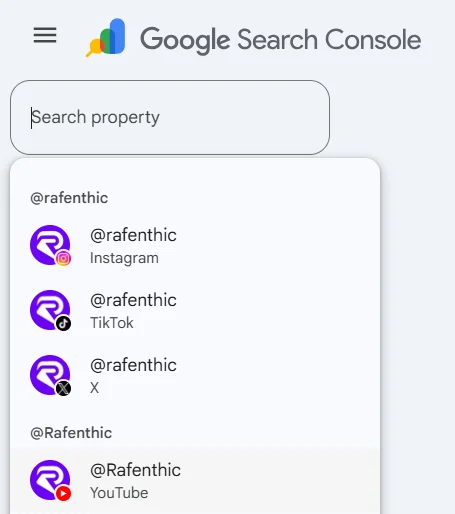
- Click the property selector dropdown in the top-left sidebar, or use the welcome screen if you are new.
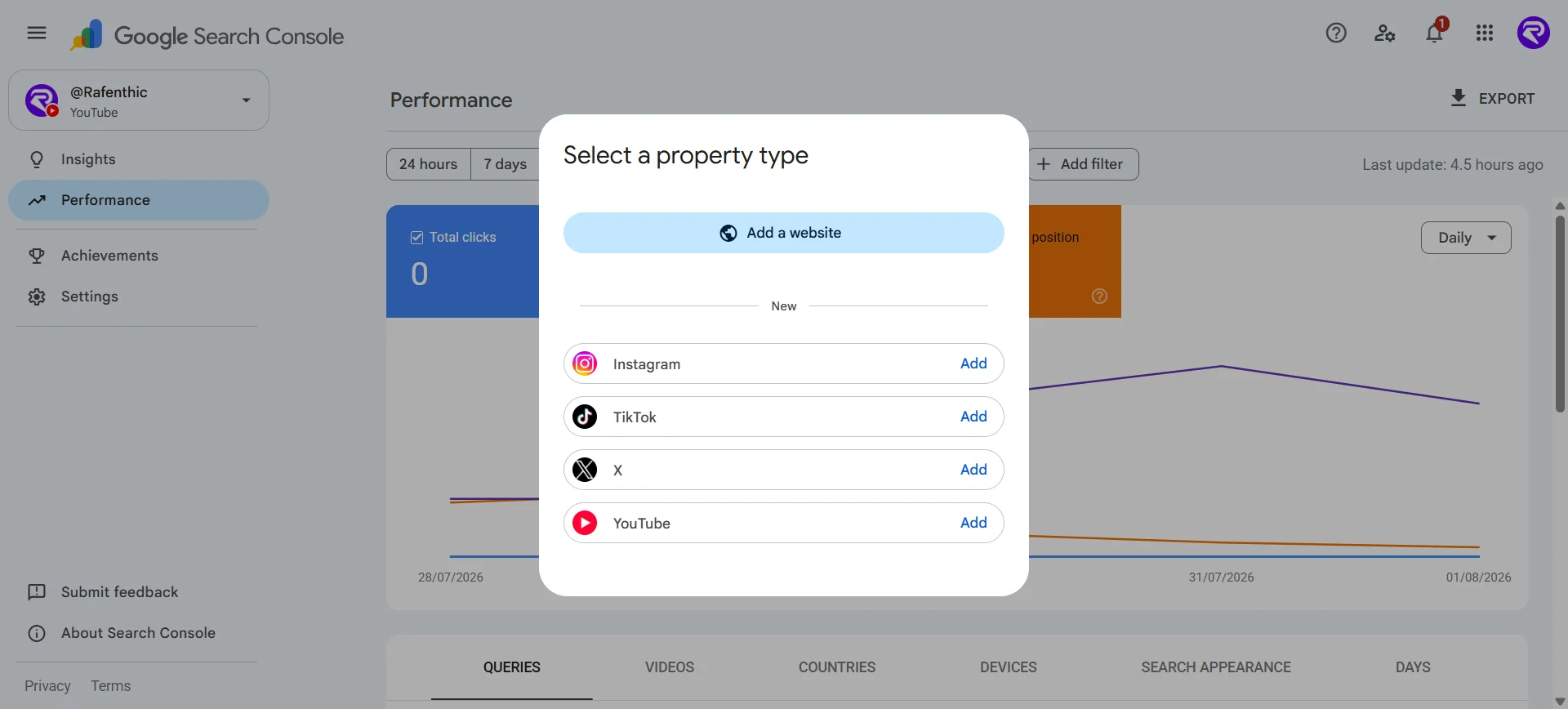
- Click Add property.
- Alongside the familiar Domain and URL prefix options, you will see the supported platforms listed. Click Add next to the one you want.
- Follow the prompts to sign in to that account and authorise the connection.
- Once ownership is confirmed, you will get a confirmation message and can click through to the property.
Three things worth knowing before you start:
- Each account is a separate property. Four accounts means running this four times. If you manage multiple brands or clients, check carefully which profile you are signed into at the authorisation step. This is the easiest place to attach the wrong account.
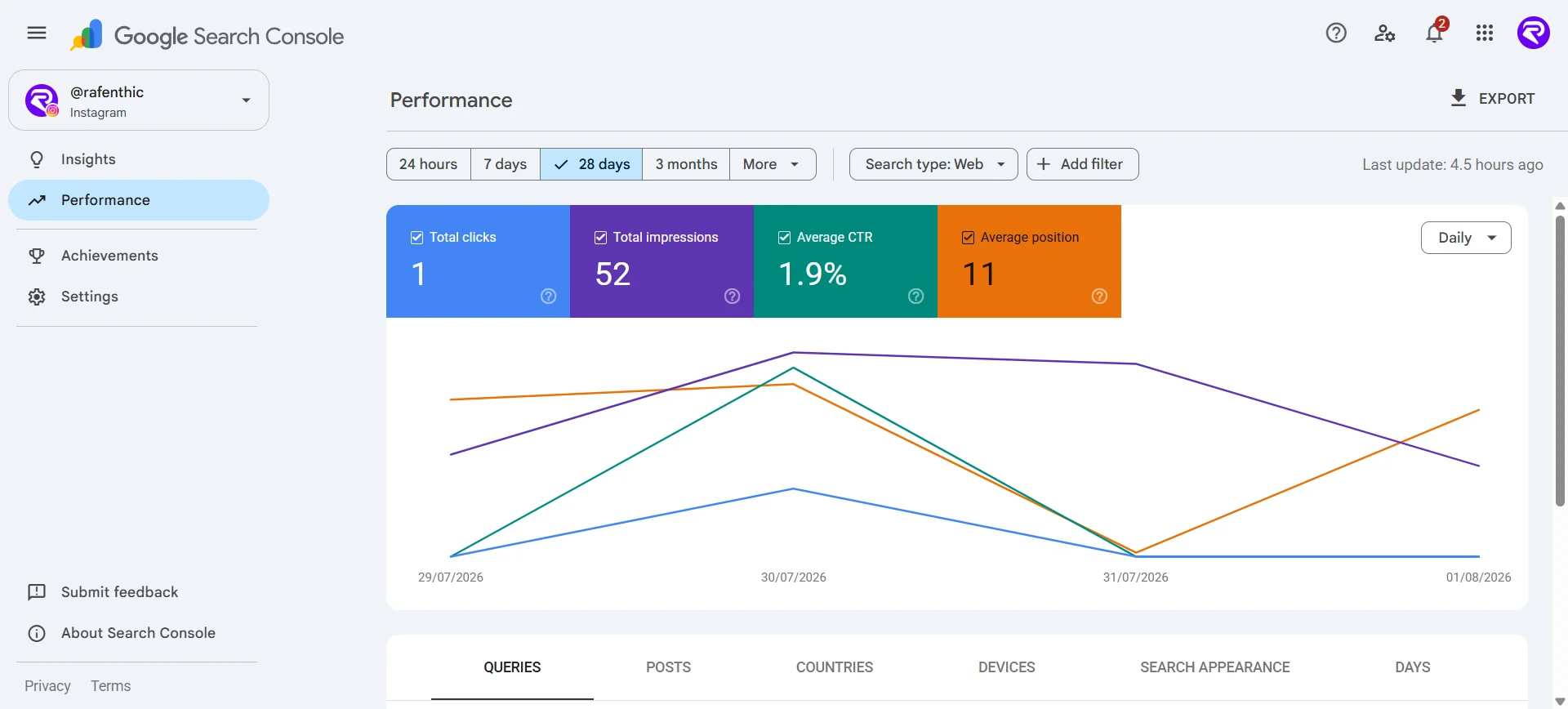
- Data is not instant. Search Console needs a few days to collect and process the first metrics. Reports default to a 28-day window, so give it at least a week before drawing conclusions.
- Your reporting starts the day you verify. Search Console has never backfilled historical data for website properties, and platform properties follow the same pattern: the clock begins at verification. Everything your social accounts did in Google Search before you clicked Add is gone from this dashboard permanently. If you take one action from this article, verify all four accounts today rather than when you next have a spare afternoon. The data you lose while deciding is not recoverable.
One catch: verification is not permanent
Google re-checks ownership periodically. If the external login expires or the connection drops, the property pauses until you re-verify.
The good news is that re-verifying restores everything. You get the same reports back and you do not wait for data to accumulate again.
The awkward part is catching it. A calendar reminder is the minimum, but it is a weak control: it depends on someone remembering to look, and a property that pauses the day after your check goes unnoticed for a full cycle. If you are running this across a client roster, treat it as a monitoring problem rather than a memory problem:
- Keep Search Console email notifications switched on for every account that owns a property, and route them to a shared inbox rather than one person's.
- Tie the check to a ritual you never skip, such as the monthly reporting pull. If a property is paused, you find out while you are already inside the tool.
- Learn the tell. A paused property shows a flat line, not a gap. Clicks that stop dead on a specific date, with no matching drop in the platform's own analytics, almost always means verification lapsed rather than performance collapsing.
How to add Instagram to Google Search Console
Choose Instagram from the platform list and sign in to the Instagram account you want to track, then approve the verification prompt.
What Instagram data is most useful for: the format question. Instagram gives you a clean comparison between Reels and standard posts, because the two live on different URL patterns. In the Performance report you can compare URLs containing /reels/ against URLs containing /p/ and see which format Google actually surfaces for your brand.
For most accounts the assumption is that Reels win everything. That is worth testing rather than believing, because static carousels can pull search traffic on informational queries in a way Reels do not.
How to add TikTok to Google Search Console
Select TikTok, sign in to the account, and authorise the connection.
What TikTok data is most useful for: speed. TikTok content spikes and dies fast, and Search Console's 24-hour filter is the right tool for it. Open the Performance report for your TikTok property and switch the chart to the 24 hours view. If a video posted yesterday is suddenly pulling search impressions, you can see it while the interest is still live.
That turns into an action rather than a report line. If a TikTok is climbing on a specific query, you have a same-day case for posting a companion Instagram Story, cutting a YouTube Short from the same footage, or writing the blog post that captures the query on a domain you actually own.
How to add X (formerly Twitter) to Google Search Console
Select X, sign in, and authorise.
What X data is most useful for: query intent around your brand name. X posts frequently surface in Google for brand-adjacent and conversational queries, the "what people are saying" style results. The Performance report's query list for your X property is effectively a read on how people phrase things when they are looking for opinion and commentary about your niche, rather than looking for a service page.
Those queries are raw material for content. A search term that leads people to a 40-word X post is a term nobody has written a proper page for.
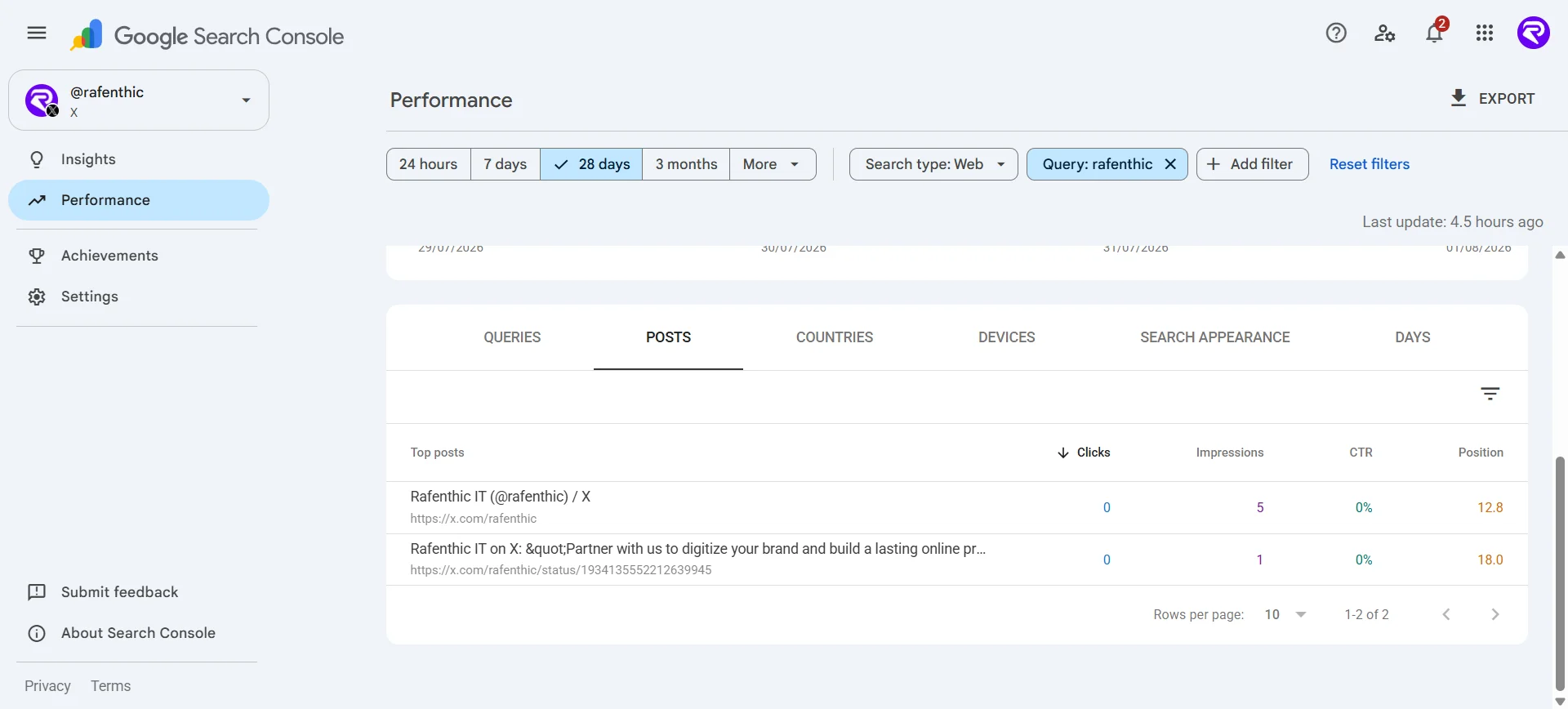
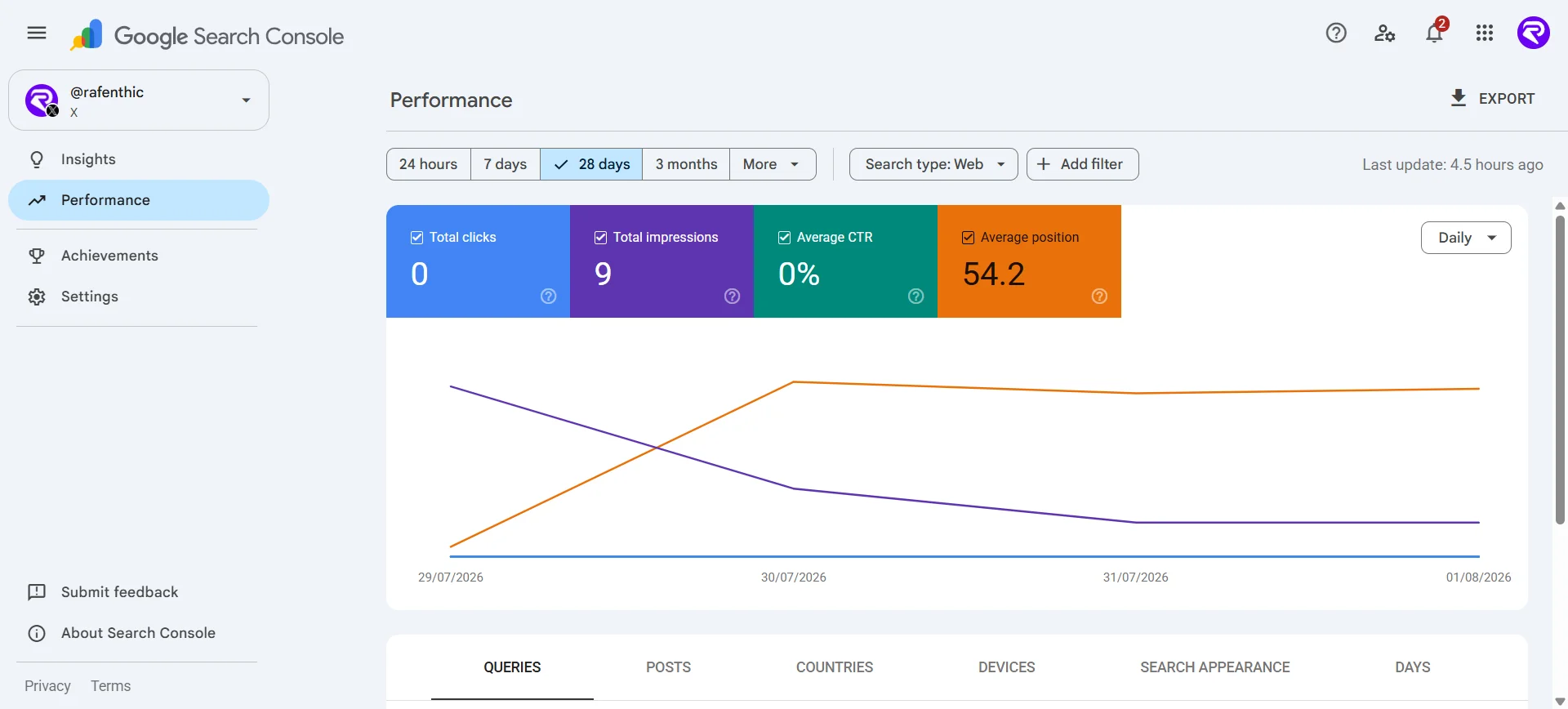
For example: over the last 28 days, the Rafenthic X account has averaged position 12.8 for the query "Rafenthic", and an individual X post has averaged position 18 for the same query. Both are shown below.
How to add YouTube to Google Search Console
Select YouTube and sign in with the Google account that manages the channel.
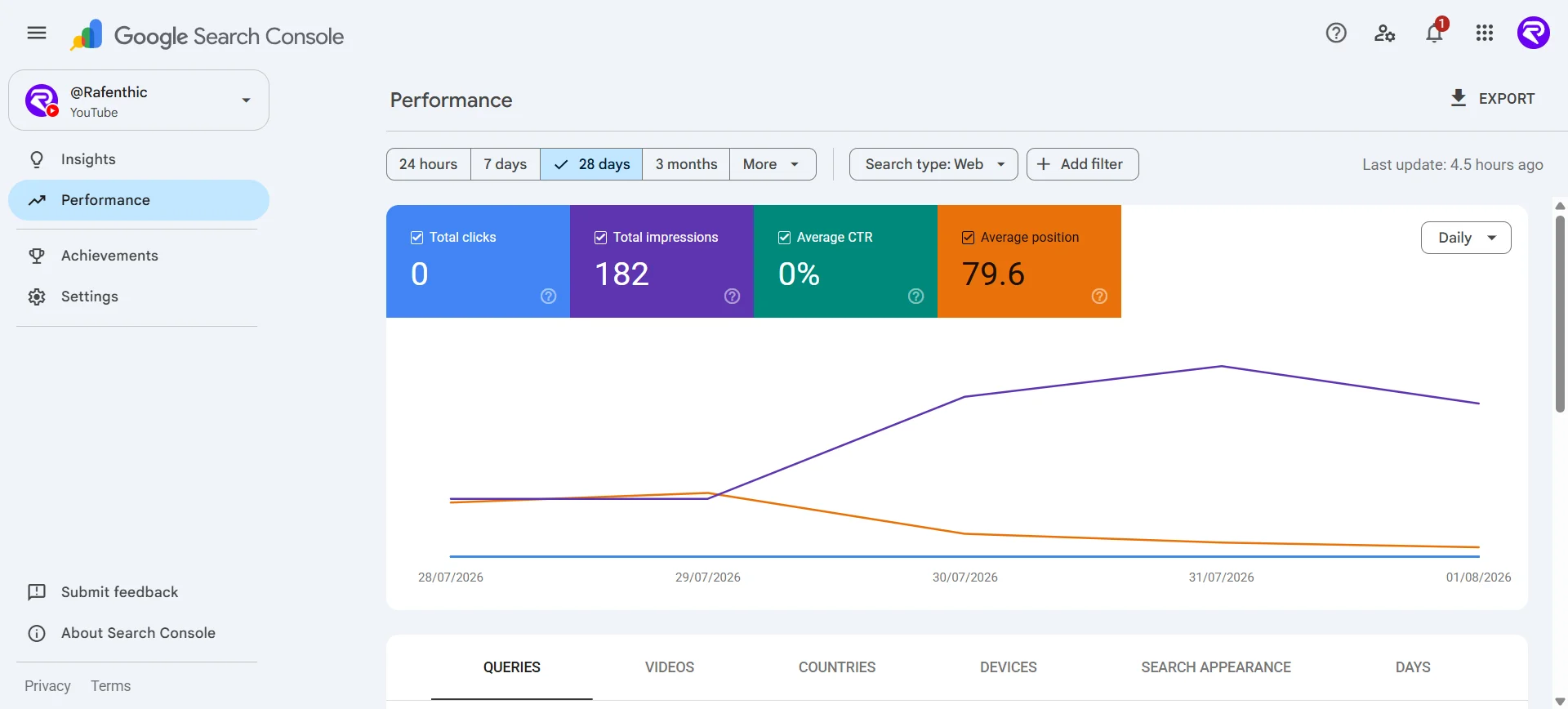
What YouTube data is most useful for: two comparisons that are genuinely hard to get elsewhere.
Shorts vs long-form. Compare URLs containing /shorts/ against URLs containing /watch to see which format Google Search, as opposed to the YouTube algorithm, is putting in front of people. These two systems do not always agree, and the gap is informative.
Playlist performance. Filter for URLs containing playlist and add the CTR and average position scorecards. You will often find playlists sitting at similar positions but pulling wildly different click volumes, which points straight at the playlist titles and descriptions as the variable. That is a copy problem you can fix in an afternoon.
Worth noting: this reports on the playlist page itself, not the videos inside it.
What reports and data you actually get
Once a property is verified, the data flows into the same three places you already use for websites.
Performance report
The familiar four metrics of clicks, impressions, CTR and average position, applied to social content. You can filter by country, date range, device and query, and use comparison mode to set two groups against each other.
This is where the URL-pattern comparisons described above happen, and where the raw query list lives.
Insights report
A simplified visual overview covering:
- Traffic trends: clicks over the last 28 days and how they distribute across parts of Google Search
- Top-performing content: the specific posts and videos pulling the most people in from Google
- How people find you: the search queries leading to your profile, channel and individual posts
- Audience location: which countries your traffic comes from
Insights also carries the query groups card, which clusters your search terms into themes and flags which groups are trending up and which are trending down. For content planning this is faster to read than a flat query list.
Achievements
Milestone tracking based on clicks from Search. Lightweight, but useful as a client-facing progress marker.
Why these numbers will not match TikTok or YouTube analytics
This is the question that derails the first client meeting where you present this data. Search Console reports 340 clicks. TikTok Analytics reports 47,000 views. Someone concludes the Search Console figure is broken.
It is not broken. The two tools are counting completely different events.
Native analytics count everything that happens on the platform. A TikTok view includes the person who found it on the For You page, the person who tapped through from your profile, the person who saw it reshared in a group chat, and the person who arrived from Google. In-app discovery is the overwhelming majority of that number for almost every account.
Search Console counts one specific route only: someone typed a query into Google, saw your post in the results, and clicked it. That is a thin slice of total activity by design.
So the gap between the two figures is not an error to reconcile. It is a meaningful metric in its own right, and it answers a question native analytics cannot: how much of my audience is finding this content through search intent rather than through the feed?
Two consequences worth carrying into your reporting:
- Never present the two numbers side by side without labelling them. "Google Search clicks" and "total platform views" need to be visibly different rows with different definitions, or the smaller number reads as failure.
- Track the ratio over time, not the absolute figure. If Google-sourced clicks are growing as a share of total views, your content is getting better at answering searchable questions. That trend is more useful than either number alone.
Five ways to actually use the data
Verifying the properties is fifteen minutes of work. Getting value out of them is the rest of it. Here is where we would start.
1. Find the queries with no home, then take them back. Pull the query list from all four properties. Any term with meaningful impressions that leads to a social post rather than a page on your own site is a content gap with the demand already proven.
These are worth acting on rather than noting. Our own X account currently averages position 12.8 for "Rafenthic", with an individual post sitting around position 18 for the same query. A 40-word post is holding search real estate that a proper page on our domain should own, and it is holding it on a platform we do not control, cannot optimise, and could lose access to. The move is to upgrade the query rather than celebrate the ranking: build the full article or service page that answers it properly, on a domain you own, then link the social post to it. You keep the social visibility and add a destination that converts.
2. Test the format assumptions. Run the Reels-vs-posts and Shorts-vs-long-form comparisons before you commit next quarter's production budget. The answer for your brand may not match the industry consensus.
3. Mark your changes with annotations, but know their scope. Search Console lets you drop an annotation, a dated bookmark, onto the timeline. Use one every time you rewrite a caption, retitle a video, or change a hashtag strategy. Three months later you can see whether it moved anything instead of guessing. Annotations sit on the individual property, so a note dropped on your TikTok timeline does not surface on the website property or the YouTube one. A cross-platform campaign needs the same annotation added in each property separately, or the record fragments and nobody finds it six months later.
4. Watch for revivals, and for decay. Older content sometimes climbs again because of a seasonal shift or a cultural moment. Impression spikes on old posts are a signal to pin it, reference it on another channel, or produce the follow-up while attention is there.
The inverse is the more valuable signal and almost nobody tracks it on social. Sort by average position and compare the current 28 days against the same window three months earlier. Content that is slipping in position while impressions hold steady is decaying: still being surfaced, increasingly being skipped. On a website you would refresh the page. Here the equivalent levers are the title, the description, the caption and the pinned comment, all of which you can edit after publication on every one of the four platforms. Fix those, annotate the date, and check whether position recovers.
5. Cross-promote on evidence rather than instinct. If a long-form YouTube tutorial pulls search traffic but the TikTok cut of the same material does not, that is a repackaging brief. The shorter version is probably missing the specific detail people are searching for.
Help Google connect your profiles to your site
Verifying a platform property is a measurement action, not an optimisation one. It tells Google nothing new about your brand. If you want to actively help Google associate your social accounts with your organisation, that is a separate job, and it happens through structured data on your own website.
Organization schema with sameAs
The sameAs property lists the other places your organisation exists online. It is the most direct signal you can send that these accounts belong to the same entity as your website.
<script type="application/ld+json">
{
  "@context": "https://schema.org",
  "@type": "Organization",
  "name": "Rafenthic",
  "url": "https://rafenthic.com",
  "logo": "https://rafenthic.com/path-to-logo.png",
  "sameAs": [
    "https://www.youtube.com/@your-handle",
    "https://www.instagram.com/your-handle",
    "https://www.tiktok.com/@your-handle",
    "https://x.com/your-handle"
  ]
}
</script>
This belongs on your homepage or in a site-wide template, not repeated on every post.
VideoObject schema for embedded video
If you embed your YouTube videos on pages of your own site, VideoObject markup helps Google understand what the video contains and makes the hosting page eligible for video results. Note the distinction: this improves how the video performs on your domain. It does not change how the YouTube page itself ranks.
Neither of these guarantees anything. Structured data is a clarification, not an instruction. But if you are already investing in social content, giving Google an explicit map of which accounts are yours costs an afternoon and removes an unnecessary ambiguity.
Getting everything onto one chart
Search Console keeps each property in its own dashboard, which is correct for analysis and painful for reporting. Nobody wants five tabs open in a client meeting.
As of this writing, platform properties do not appear to be available yet in the Search Console connector for Data Studio (formerly Looker Studio), likely a rollout gap between the feature and the connector rather than anything you're doing wrong. If it lands, this is where a unified cross-platform chart would live. Until then, the built-in export from each property's Performance report is the reliable way to combine the data.
The limitations you should be clear about
Worth stating plainly, especially if you are presenting this to clients:
- It only measures Google. Discovery inside TikTok, Instagram, X or YouTube is invisible here. Native analytics still matter.
- It does not improve rankings. This is a measurement tool. Verifying a property does not make Google favour your content.
- It does not guarantee indexing. Your posts appear in Search on Google's terms, not because you added a property.
- There is no historical data. Reporting starts at verification and cannot be backfilled.
- Verification can lapse. Build a re-check into your process, as covered above.
- Data lags a few days after setup, and reports default to 28 days.
Frequently asked questions
What are platform properties in Google Search Console?
A property type that lets you verify a social or video account (Instagram, TikTok, X or YouTube) and see how its content performs in Google Search, Discover and News. It is the first Search Console property that does not require owning a domain. Full details are in the Search Console Help documentation.
Which platforms are supported?
Instagram, TikTok, X (formerly Twitter) and YouTube. Google has not ruled out adding more.
Do I need a website to use platform properties?
No. Creators with no website can verify their accounts and use Search Console for the first time.
Does Search Console show data from before I verified the account?
No. Search Console does not backfill historical data, so your reporting begins on the day you verify. Any search performance your account generated before that point is not recoverable in this dashboard, which is the main argument for verifying sooner rather than later.
Why does Search Console show far fewer clicks than my TikTok or YouTube analytics?
Because they count different things. Native analytics count all activity on the platform, including feed discovery, profile visits and shares. Search Console counts only people who arrived from a Google search. The gap is expected and is itself a useful measure of how much of your audience arrives with search intent.
Does this replace Instagram Insights, TikTok Analytics or YouTube Studio?
No. It measures discovery through Google only, not activity inside the platforms. Use both.
How long until data appears?
A few days after verification. Reports default to a 28-day view.
Can I add multiple accounts?
Yes. Each account is added and verified separately and reports independently.
Can I give a client or team member access to one platform property only?
Search Console permissions are managed per property, so a platform property can be shared without granting access to your other properties. If you manage client rosters, confirm the behaviour with a low-risk account before promising a client that access to their TikTok property will not expose anything else.
What happens if verification expires?
The property pauses until you re-verify. Once you do, your reports return in full with no waiting period for data to rebuild.
Does adding a platform property affect my website property?
No. Existing website properties are untouched and platform properties sit alongside them.
Where this goes next
The interesting thing about platform properties is not the feature. It is the admission behind it. Google is confirming that content on platforms you do not own is a real part of how people find you, and that it is worth measuring in the same place you measure your website.
For anyone still running SEO and social as separate disciplines with separate reporting, that is a prompt to reconsider the org chart, not just the dashboard.
We are tracking all four Rafenthic properties and will publish what the data looks like after a full quarter. Google's own guide to analysing social and video content is worth reading alongside this if you want the official version.
Want your search and social performance in one strategy instead of two reports? Talk to us about SEO and digital marketing.